
How can handling units be created quickly and directly in the SAP system?
Are manual packing processes holding back your dispatch logistics?
Are your staff at the packing station wasting valuable time because handling units are too time-consuming to create in standard SAP?
When packing processes are complicated or only work via external dispatch systems, this leads to unnecessary clicks, sources of error and a lack of transparency. The result: delayed processes, queries in the warehouse and a dispatch operation that isn’t running as efficiently as it could.
Instead, imagine creating handling units quickly and directly within the SAP system with clear transparency. No detours, no workarounds, right where your logistics operations take place.
Eliminate the bottleneck in the packing process – and make your dispatch efficient again!

Manage packaging processes effectively with M.PackingStation
Benefits of SAP-integrated packing processes
| 01. | Time saving |
| Automated creation of handling units saves up to 30% of the time per package. | |
| 02. | Zero-defect rate |
| Scan-protected processes prevent incorrect deliveries and costly returns. | |
| 03. | Fully integrated with SAP S/4HANA and SAP ERP |
| No external interface required – you work directly within your familiar SAP environment. |
![[Translate to englisch:] Logo M.SmartLogistics](/fileadmin/products/suiten/icon-m-smartlogistics.svg)
M.PackingStation
A module of the M.SmartLogistics suite
![[Translate to englisch:] Rent or Buy](/fileadmin/images/divers/logos/Stempel_Mietl%C3%B6sungen.png)
All Mercoline solutions are also available on a subscription basis.
Case study: Standardised shipping processes at Boehringer Ingelheim
 “The application enables us to process all courier shipments directly in SAP. This has allowed us to achieve a high level of data integrity whilst reducing manual process steps.”
Harald Koitzsch, Business Project Manager Boehringer Ingelheim Pharma GmbH & Co. KG, Logistics and Fleet Management
Objective: To simplify dispatch processes and order fulfilment in SAP, integrate scales and scanners, and provide track and trace functionality for end users






The process: 4 steps to a shipping label
1. Identification
- Start by scanning or entering an SAP SD order, delivery or shipment.
- Automatic identification of items via the SAP document flow.
2. Allocation of packaging materials
- Quick selection of packaging materials via barcode scan.
- Dimensions imported directly from SAP master data.
3. Additional data (handling unit)
- Automatic weight transfer via scale connection.
- Alternatively: Manual entry or automated calculation of weights.
4. Finalisation & Printing
- Creation of the handling unit (HU) directly in the standard SAP system at the touch of a button.
- Immediate printing of parcel labels and shipping documents.
As M.PackingStation handling units are fully integrated into your SAP system, the data can be easily processed in subsequent stages, for example in the Mercoline shipping solution M.TransportCommunicator.

M.PackingStation at a glance
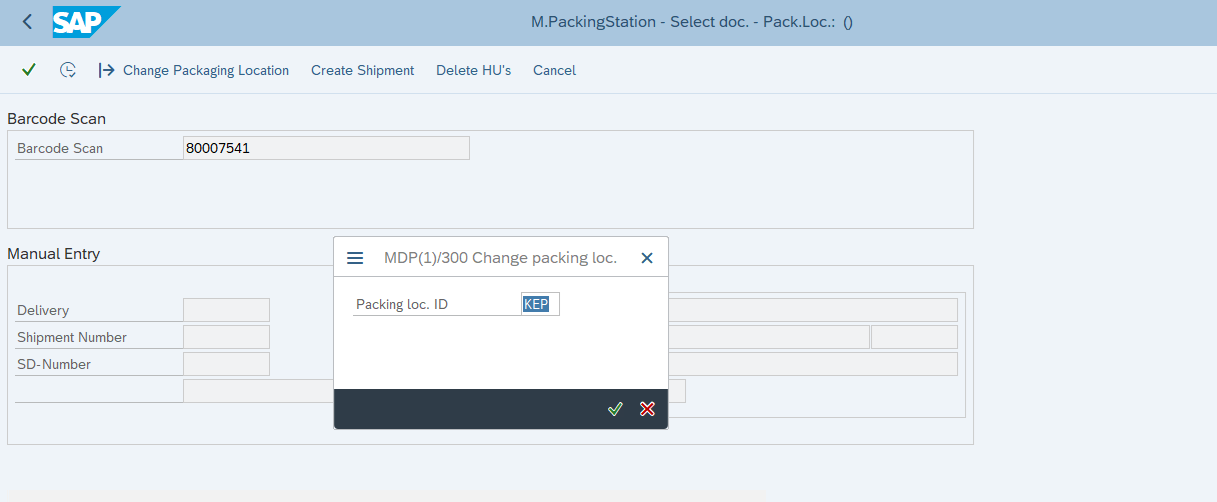
Scan the barcode or select the consignment manually, then choose a packing bay

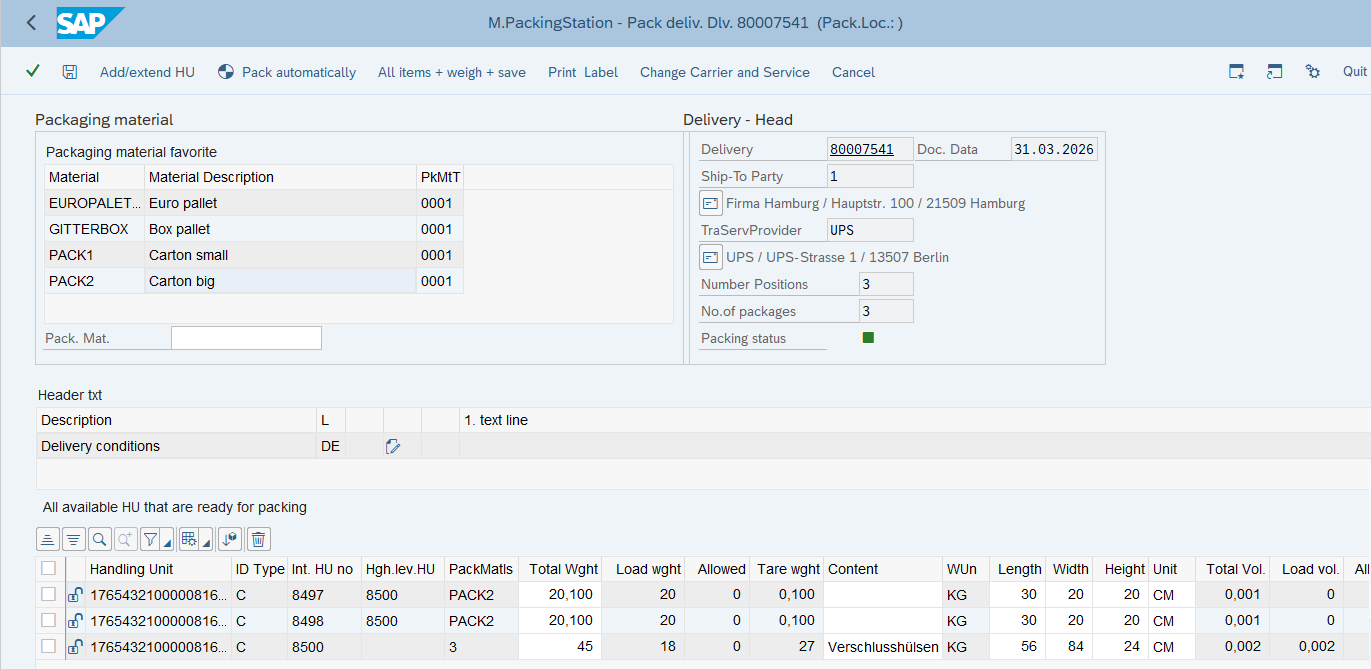
Select a parcel, pack all items in one click via the scales integration

![[Translate to englisch:] Labeldruck Packing Station](/fileadmin/products/verpacken/label-packingstation.png)
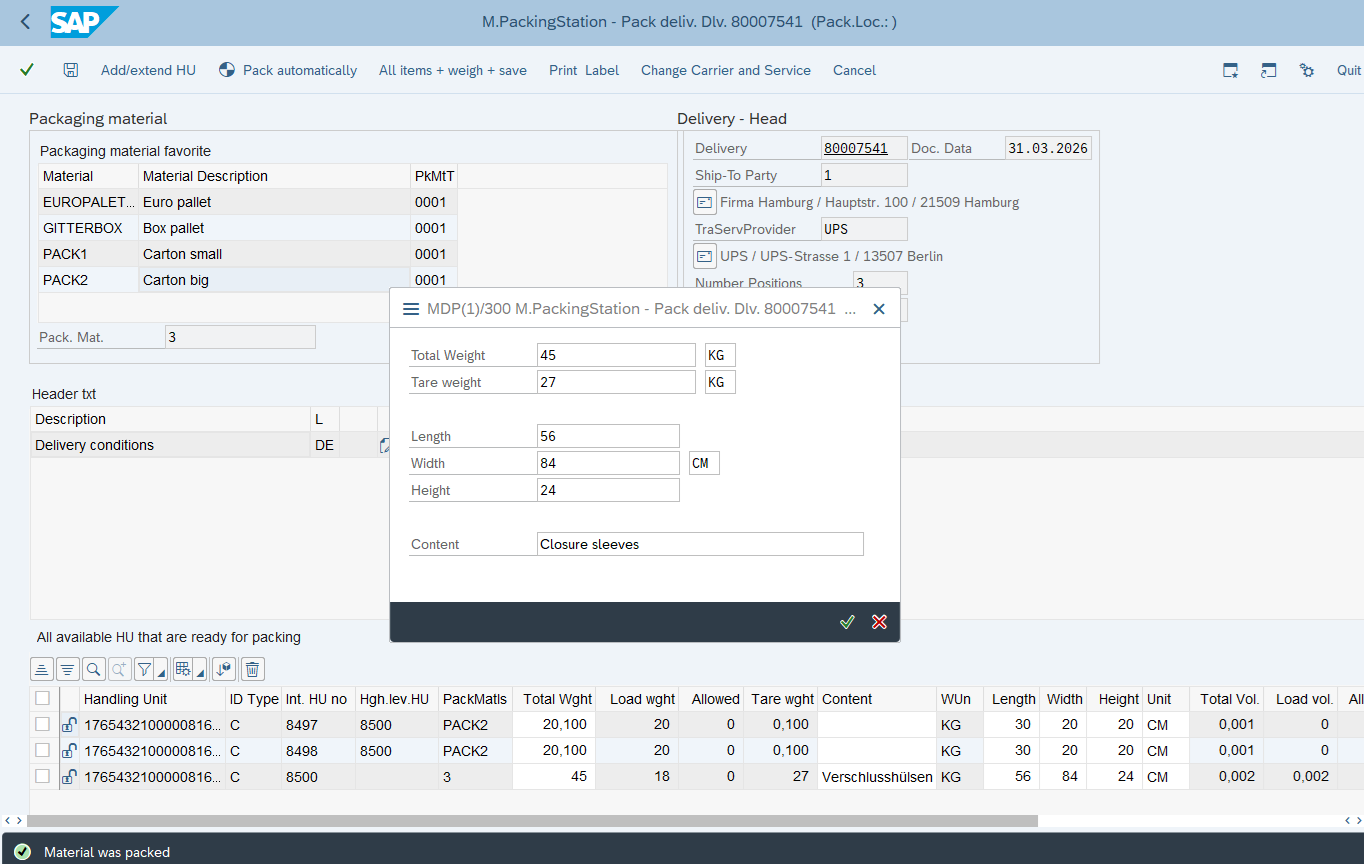
Change header texts for shipping documents, create and extend handling units, pack partial quantities
Fully integrated with SAP
- Use of standard HU structures in SAP
- Minimal training required; no need to use a separate shipping application
- SAP master and transaction data are reused directly
- Full integration into the SAP logistics process
- SAP document flow can be utilised
- Uniform architecture (no new hardware, database, etc.)
- For SAP ERP and SAP S/4HANA
We will be happy to advise you!
Passende Blogbeiträge


